Pages

Showing posts with label Antispam. Show all posts
Mozilla FirefoxThis weekend I finished setting up a fresh triple-boot install on my MSI laptop. With my operating systems ready to go, the time had come to start reinstalling applications. While it wasn't a conscious decision, I noticed that the majority of my apps were Open Source - so I decided to keep the ball rolling.

Even if you haven't just gone through a reformat, these are great applications and well worth installing. If you have, then hopefully this list will provide you with a solid base of programs to get you started with your fresh, new Windows install!

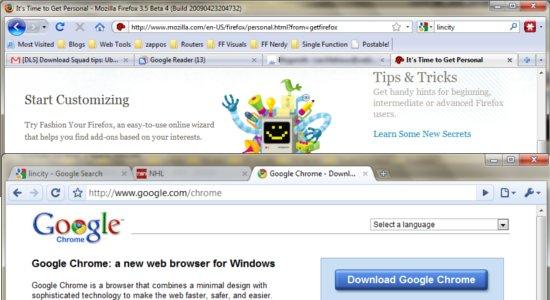
Web Browsers: Chromium, Firefox
They excel at different things, so I install both browsers by default. Chromium is great for all-purpose surfing, while I use Firefox and my favorite extensions to tackle my daily web-based work.

Office: OpenOffice.Org, Sumatra, PDFCreator
For lightweight PDF reading and creation from any Windows app, Sumatra and PDFCreator are solid options. OpenOffice.Org, well, it's the name to beat in open source suites.

Media: Songbird, VLC, Handbrake, DVD Flick
I've been using VLC for ages, and it does everything I need as my video player of choice. Audio duties I leave up to Songbird, which has matured into a fantastic application over the past two years. I use Handbrake to, uh, rip my non-encrypted, personal DVDs. DVD Flick lets me burn said rips back onto a disc.
Free Download Manager
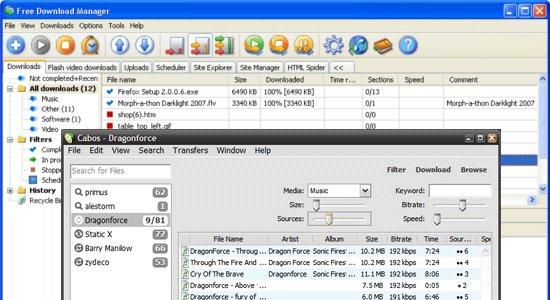
File Transfer: Free Download Manager, Cabos, eMule
FDM is a very underrated torrent app, and it has plenty of other download-boosting abilities as well. I chose it over Vuze because I need FDM's extras (partial zips, Flash downloading, Rapidshare integration) more than Vuze's additional media-handling chops. Cabos trims Limewire down to the bare minimum for the occasional one-off Gnutella download. As for eMule, I use it to find things that I can't find elsewhere.

Imaging: ZScreen, Inkscape, Gimphoto/GimPad, Flickr Uploadr
If you're comfortable with Photoshop but looking for a free alternative, go with Gimphoto instead of Gimp – the interface is very Adobe-esque. For vector image jobs, Inkscape can't be beat. ZScreen handles my screen captures and Flickr Uploadr, well, it does what it says.

Burning and Backup: Infrarecorder, WinCDEmu, Bonkey, and DirSyncPro
These three apps make short work of mounting disc image files, burning just about anything, syncing folders, and keeping a current copy of your files in a safe location.
Spaz
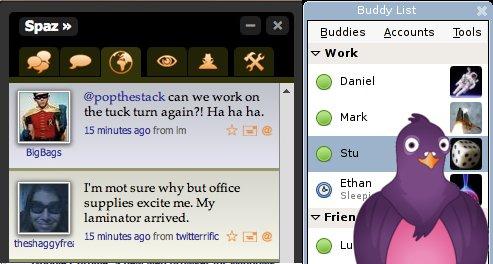
Messaging and Social Networking: Pidgin and Spaz
Don't sic Mr. Stallman on me – I know Spaz is built on Adobe Air, but the client itself is open. As for multi-protocol messaging apps, Pidgin is a tough bird to beat.

Maintenance and Utilities: 7zip, Belvedere, Ultra Defrag, Disk Cleaner, TrueCrypt
Lifehacker's Belvedere is a great way to organize your files and folders with minimal effort. Ultra Defrag and Disk Cleaner (and a handful of helpful plugins) keep your hard drive clutter free and performing its best. 7zip waits in your context menu to extract files from (or cram files into) archives of all kinds. For encrypting files, folders, or entire volumes, Truecrypt is fast and reliable.

Desktop Enhancements: RocketDock, Launchy, Virtual Dimension
You don't really need both RocketDock and Launchy. If you prefer eye candy, go with Rocket Dock. If you're a keyboard magician, go with Launchy. I run Virtual Dimension because my forays into Linux have me hooked on the benefits of virtual desktops.

Nexuiz, LinCity-NGGames: AssaultCube, Enigma, FreeCiv, LexJongg, LinCity, Neverball, Nexuiz, PokerTH, TORCS, Tremulous, WinSudoku, Wormux, Zombies.

Using your computer shouldn't be all work, all the time. Kick back and relax or give you brain a casual workout with these great games. LexJongg puts a slightly technogeek spin on traditional mahjong. FPS fans should check out AssaultCube, Nexuiz, and Tremulous. FreeCiv and LinCity offer OSS takes on two classic PC simulations. TORCS is a solid 3d racing sim which will hopefully soon include online action. Wormux and Zombies are fun turn-based strategy games. WinSudoku and PokerTH - I'll assume you know what those are all about.

There you go - plenty of great OSS to load on your own freshly reinstalled system (or a friend's)! If I missed one of your favorite apps or games, share it in the comments!

[Source]
Windows LogoMicrosoft has been constantly boosting the security capabilities of its Windows clients, and the company has the numbers to prove it.

In the Microsoft Security Intelligence Report Volume 9 (for the first half of 2010) released at RSA Europe, the Redmond company points out that users running Windows 7 are less susceptible to infections with malware designed to transform their PCs into zombie machines than customers that continue to use Windows Vista or Windows XP.
There are less Windows 7 computers compromised and made part of botnets than Vista and XP, even if the two platforms have the latest service pack installed, as users can see in the graphic included in this article, courtesy of Microsoft.

“The botnet infection rate for Windows 7 and Windows Vista is significantly lower than that of their desktop predecessor Windows XP with any service pack installed, which reflects the security improvements that have been made to the more recent versions of Windows,” the company explained.

“Considering only computers that have had the most recent service pack for their operating systems installed, the infection rate for Windows XP SP3 is twice as high as that of Windows Vista SP2 and more than four times as high as that of the release-to manufacturing (RTM) version of Windows 7.”

Bot Related MalwareThe fact of the matter is that Windows XP SP3 and XP SP2 have the highest infection rate out of all Windows operating systems, even higher than XP SP1 and XP RTM.

Microsoft has dropped support for older versions of Windows XP, and this how the company explains the drop in infection rates, as MSRT is not installed and executed on non-supported platforms.

“As IT departments and computer users move to more recent service packs or Windows versions, computers running older operating system versions are often relegated to non-production roles or other specialized environments, which may explain the lower infection rates,” the company stated.

SIRv9 comes to prove, if there was any need, that customers are better off running the latest version of Windows, at least when it comes down to taking advantage of the security enhancements delivered by the Redmond company.

“The features and updates available with different versions of the Windows operating system, along with the differences in the way people and organizations use each version, affect the infection rates seen with different versions and service packs,” the software giant said.

Windows 7 RTM Enterprise 90-Day Evaluation is available for download here.

[Source]
Malwarebytes Anti-Malware

One software that I always install on my personal computer or recommend to family and friends is Malwarebytes’ Anti-Malware – a free malware removal tool. It’s also one of the programs I use to fix/clean up client’s computers. Like I’ve mentioned before, I am the family desktop support person, so when family and friends need help, they go to me. The most common request I get from family, friends and clients is to clean up their computers which have been infected by viruses, spyware and malware.

When I get my hands on the “problem” computer, one of the first things I do is install Malwarebytes Anti-Malware. Before I perform a full system scan, I make sure that I update the program to it’s latest definition update. This is an easy task if there is an Internet connection. In some cases, the computers can’t connect to the Internet because of the virus, spyware and malware infection so this task becomes impossible. But I’ve found a workaround that allows me to manually update Malwarebytes Anti-Malware.

Today, I’ll share with you two ways on how to manually update Malwarebytes Anti-Malware so you can update the program even if your computer doesn’t have an Internet connection.

STEP 1

This step requires a separate computer that has access to the Internet and has Malwarebytes Anti-Malware installed on it.

1. Update the Malwarebytes Anti-Malware on that computer to make sure that you get the latest definition update.
2. Open the Malwarebytes Anti-Malware program folder and look for the file “rules.ref“.

Windows XP and Windows 2000
C:\Documents and Settings\All Users\Application Data\Malwarebytes\Malwarebytes’ Anti-Malware\rules.ref

Windows Vista and Windows 7
C:\ProgramData\Malwarebytes\Malwarebytes’ Anti-Malware\rules.ref

3. Copy the “rules.ref” file.
4. Paste the “rules.ref” file into the Malwarebytes Anti-Malware program folder on the computer that doesn’t have Internet connection.

STEP 2

1. Download the defintion update from the Malwarebytes Anti-Malware website.
http://data.mbamupdates.com/tools/mbam-rules.exe
2. Run and Install.

NOTE: The definition update provided in this link may not always be the latest compared to the definition updates received via built-in program update feature.

Those are the two simple steps on how to manually update Malwarebytes Anti-Malware. Just follow any of the steps and that’s it! Your copy of Malwarebytes Anti-Malware is now up-to-date. You can use this next time you need to update a copy of Malwarebytes Anti-Malware on a computer without Internet connection.

[Source]
BadBoy Anti Spam Automatic ReporterBadBoy history/description :

With the introduction of the Blizzard chat throttle added in WoW v4, BadBoy has removed the code for throttling chat and for filtering ASCII art. On top of that I'm hoping the floating spam bots have been fixed so I've removed the sleep emote filter.

BadBoy is now once again a nice and simple gold/hack/phishing/casino blocker & reporter. However I will adapt this addon if people find new ways to get past Blizzard's code.

Can I configure it?

Type /badboy ingame

What sets this aside from other spam blockers?

BadBoy was created with a focus on assisting Blizzard and the user with spam removal, whilst being a light and efficient addon.

[Source]
Spamfighter 7.1.58, Anti Spam

If you are looking for an Outlook, Outlook Express, Windows Mail or Mozilla Thunderbird spam filter to remove spam and phishing e-mails from your Inbox, Spamfighter is the spam filter you are looking for. Spamfighter is using the power of 7 million people that instantly report if they receive a spam mail. When several people have reported the same spam mail, it's automatically blocked for the rest of the Spamfighters. In this way very few people will ever see the spam mail. On top of that a lot of spam is filtered before it ever hits the community by the spam filter.

What's new in this version:
Version 7.1.58 adds support for Mozilla Thunderbird 3.1 and Microsoft Outlook 2010.